ICC

IPCONIQ HMI

The operator's screen,
right at the machine

Cost-effective, easy-to-learn SCADA/HMI platform for SMEs and machine builders. The alarms, trends, recipes and reporting a monitoring project needs, in one package.

Request a quote Place in the architecture

4,500+
free device drivers
1997
first release
64 – 60,000
tag options
Client · Browser
server architectures
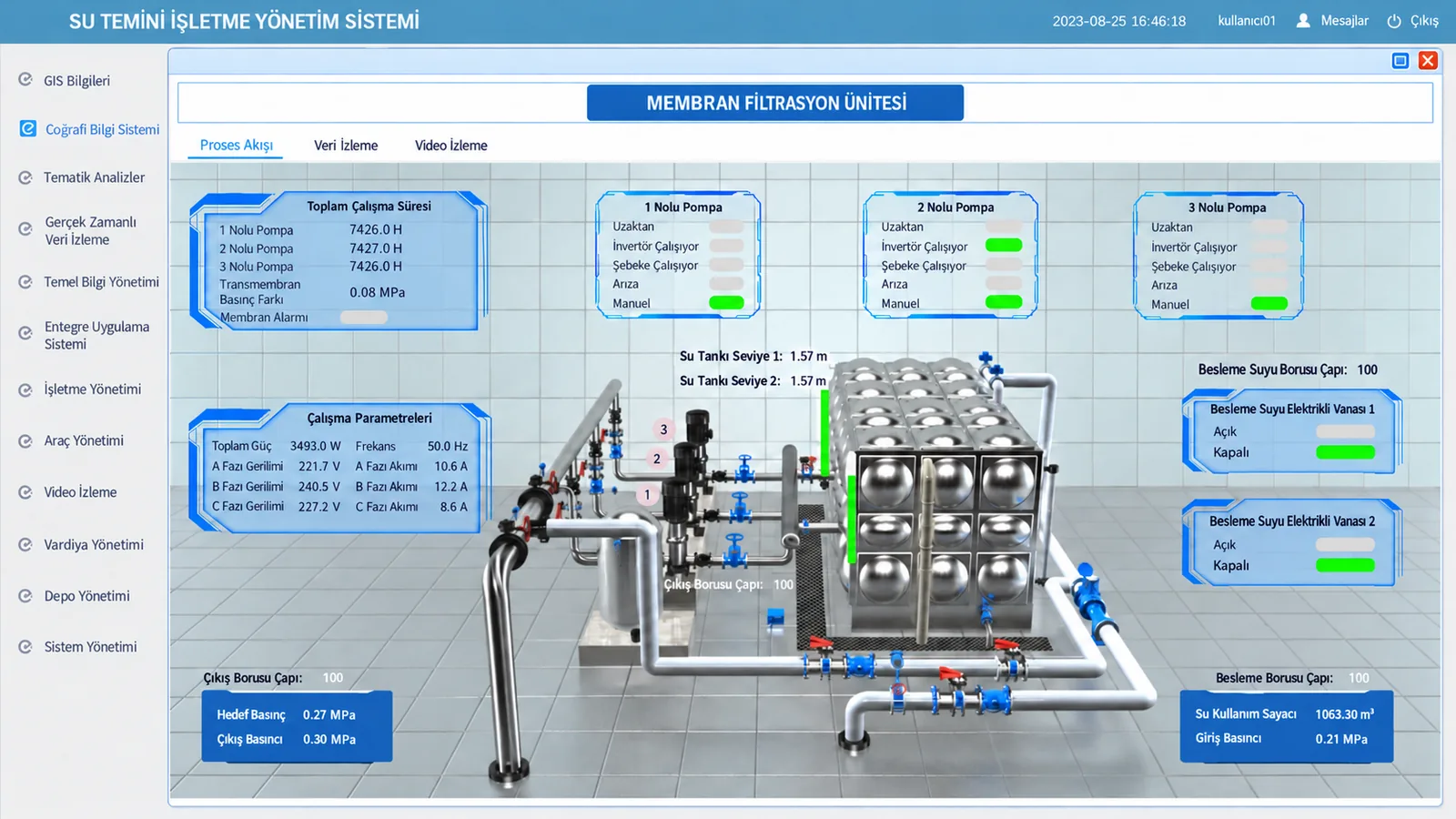
Membrane filtration unit screen built with IPCONIQ HMI
HMI Membrane filtration unit screen built with IPCONIQ HMI

What it does

One line, one machine, one plant

IPCONIQ HMI is a SCADA/HMI platform designed for small and medium-sized monitoring applications. The alarm, trend, recipe and reporting functions an operator screen needs come inside the package, not as separate modules.

The same project can be deployed as Client/Server or Browser/Server. An installation that starts with a single panel at the machine can be opened up to plant-wide web clients without changing the architecture. All communication drivers are free.

Runtime

What you see at the unit

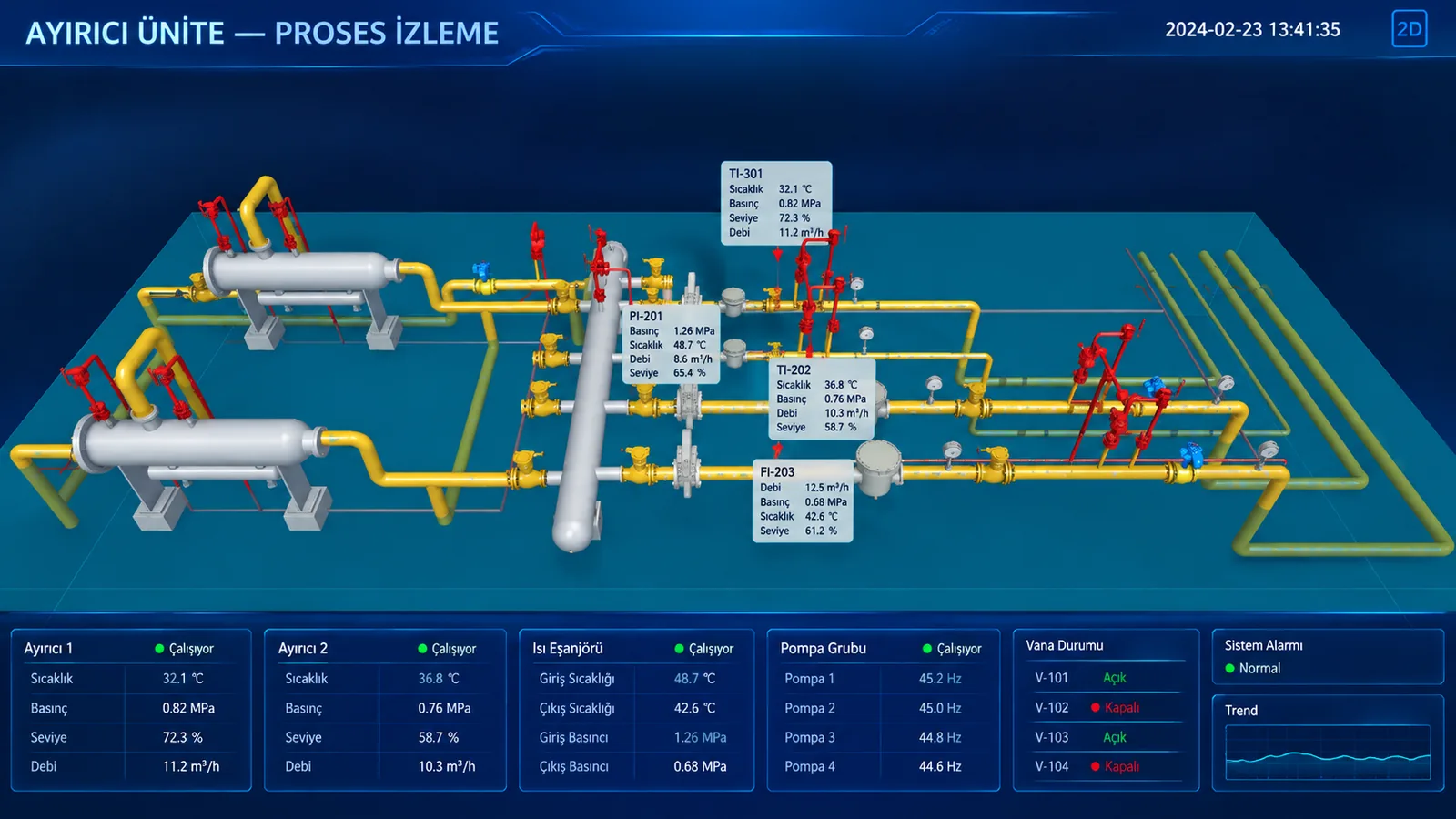
Separator unit process monitoring screen built with IPCONIQ HMI
  • Equipment status
  • Measurement points
  • Valve positions
  • System alarm

The screens are representative examples prepared to show what the platform can do; they are not images of any specific customer's live system.

Capabilities

What comes in the package

Data acquisition
With 4,500+ free drivers, real-time data is read from PLCs, RTUs, DCSs and smart devices from different manufacturers. Driver selection is independent of the license.
Alarms and events
Alarm conditions are defined per tag; events are written directly to an SQL database and remain queryable.
Historical data
The logging target is chosen per project: built-in database, standard SQL database or industrial historian.
Reporting
Daily, monthly and yearly report templates are included. When a template is not enough, custom reports can be written with report scripts.
Trend curves
Real-time and historical trends are shown on the same screen; time range and tag selection can be changed at runtime.
Recipe management
Parameter sets are saved and downloaded to the device. On product changeovers the operator does not need to enter parameters one by one.
Web publishing
Monitoring screens are published to the browser. No client-side installation is needed; access is limited by the user package.
ECharts visualization
The Apache ECharts library is built in; it is used for visualizations beyond the standard chart types.
Email and SMS
Notifications are sent based on alarm conditions. SMS requires a GSM module or third-party software.
Redundancy
Dual-server hot standby, dual device and dual network can be configured. The data flow is not interrupted during failover.
Script engine
Built-in C/C++-like scripting language; used for calculations, conditional logic and automated tasks.
OPC UA/DA and MQTT
Communication with third-party systems and IoT devices is established over standard protocols.
WebServices
REST and SOAP interfaces are used to exchange data with MES, ERP and other IT systems.
FDA 21 CFR Part 11
Electronic signatures and an audit trail are built in; no additional development is needed for pharmaceutical and food projects.
Network structure
Client/Server and Browser/Server models are built on the same project; the architecture can be changed later.

Architecture

Where IPCONIQ HMI fits in the system

It runs in the operations layer. In small installations it can connect directly to field devices; in growing systems, data acquisition is handed over to IPCONIQ Connect and archiving to IPCONIQ Historian.

FIELD EDGE / CONNECTIVITY OPERATIONS DATA ENTERPRISE PLC CNC Sensor Energy meter IPCONIQ Connect OPC UA MQTT · Modbus IPCONIQ HMI IPCONIQ SCADA IPCONIQ Historian MES ERP Cloud Analytics
4,500+ driversClient · Browser64 – 60,000 tags
LayerScope
Device layerPLC/RTU, DCS, smart meter, CNC, DDC and OPC sources
Monitoring layerAlarms, trends, recipes, reporting, user security, data logging
Application layerPC client, web client, mobile client and cloud
Enterprise connectivityREST API, WebServices, SQL Server, Oracle, MySQL, PostgreSQL

Licensing

License types and terms

License types

Development Only (DO)Developing and testing SCADA/HMI applications.
Runtime Only (RT)Running the developed application in the field / in production.
Development Full (DF)Combined use of development and runtime.
NetView (Client/Server client)Distributed monitoring client in a client–server architecture.
WebServerBrowser-based remote monitoring.
Add-on modulesE-signature (FDA 21 CFR Part 11) and OPC UA are purchased separately.

License terms

Tag-based licensingThe license is based on the total tag count. Tag calculation: memory tags + I/O tags.
Tag options64, 128, 256, 512, 1,024 and 60,000 tags.
Communication drivers4,500+ drivers are supported, all of them free of charge.
Web client5, 10, 20, 50 and 100 user packages (IE and Microsoft Edge).
Mobile app5, 10, 20, 50 and 100 user packages for IPCONIQ Mobile (Android).
Demo mode2-hour resettable runtime and up to 64 tags.
License durationPurchased licenses are perpetual.
License formUSB hardware dongle or software license.
Quote & demo

Let's choose the right platform for your project together

Share your tag count, architecture and field protocols, and we will prepare a license configuration and price quote.

  • Licensing
  • Engineering
  • Local support in Türkiye
IPCONIQ

IPCONIQ is a trademark of ICC Dijital. Product descriptions and technical data are based on the manufacturer's official documentation. Specifications are subject to change without notice; binding values are stated in the project-specific quotation.