







ICC
The Informed Technology Series

Become Technology
Literate

Use technology with your eyes open. Buy the right product by asking the right questions. In the industrial computer market, a gap in technical knowledge is often presented as a price advantage.

5 Video Episodes 8 Right Questions A Transparent Quote
5
episodes
on one page
2013
the release year of processors
still sold as "new"
8
questions to ask
before you buy

The physical condition of an industrial computer and its technological age are not the same thing. A unit whose box has never been opened can have a ten-year-old processor; an impressive-looking amount of RAM can be hiding a weak one. Seeing that difference is not a matter of technical expertise — it is a matter of asking the right questions.

The Series

The Five Episodes

Each episode uses a short animation to explain a situation we meet often in the field. You can watch the videos directly on this page.

Episode 01 0:51
01

From What Year?

The processor's real age

A J1900 from 2013, or a 5th, 6th or 7th generation i5, can still be sold today as a "new product". The unit may be brand new, but the technology inside it can be ten years old. Most of these processors do not support Windows 11, their security updates have ended and they are no longer in production.

The main point: A product being new in the box does not mean the technology inside it is new.
See the LinkedIn post
Episode 02 0:42
02

The RAM Trap

A big number, an unbalanced system

A large amount of RAM looks impressive on a quotation and often draws a curtain in front of a weak processor. In reality the processor chokes at 100% while all that memory sits idle — because RAM holds the data, the processor does the work. A system is only as fast as its processor.

The main point: Pick the processor for the job, then the RAM to match. More RAM will not strengthen a weak processor.
See the LinkedIn post
Episode 03 0:42
03

Which i5?

The generation decides, not the name

"i5" is the name of a range, not a measure of performance or how current a part is. 6th, 7th, 8th — even some 10th generation i5s are still described simply as an "industrial i5". Years and a wide technology gap separate them; under a modern workload the older generations stall at the first corner.

The main point: The right question is not "is it an i5?" but "which generation, and is it still supported?"
See the LinkedIn post
Episode 04 0:51
04

Behind the Box

A special offer, or clearing old stock?

Boxes that have sat on the shelf for years get "special offer", "last units", "in stock" and "low price" stickers — and the production year underneath disappears from view. The sticker stays at the front while the facts you need to decide stay at the back.

The main point: Available from stock does not mean it is the right product.
See the LinkedIn post
Episode 05 1:04
05

The Best Service

Service capability ≠ product reliability

After-sales service matters, and getting a faulty unit repaired and back in service quickly is valuable. But a system may simply be very good at handling the failures it has — the real goal is for those failures to be rare in the first place. While the unit is away, production waits, the operator waits and the delivery schedule suffers. The repair may be free; the downtime is not.

The main point: The best service is the service you never need.
The Common Thread

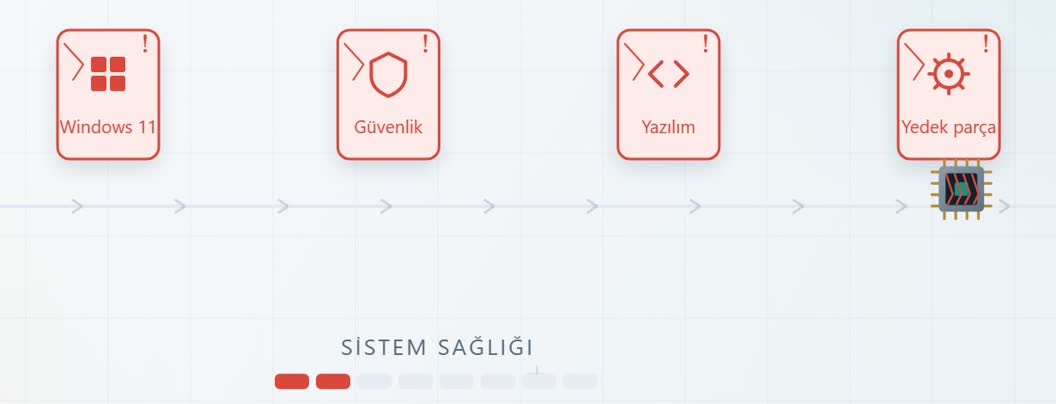
An Old System Takes Damage at Every Wall

The thread running through every episode is this: the wrong system works on day one — the trouble starts later. An older generation processor runs into one wall after another.

An old processor taking damage at the Windows 11, security, software and spare parts walls
A current operating system
Support for Windows 10 has ended, and older generation processors are not on the official Windows 11 compatibility list.
Security requirements
A platform that no longer receives updates leaves an open door in your production network.
New software and performance
SCADA releases, image processing and data acquisition workloads grow heavier every year.
Spare parts and supply
A discontinued platform cannot be bought again in the same configuration when you extend the line.
Every wall means extra cost, downtime and an unplanned replacement investment. The system bought cheaply can turn out to be the most expensive of all.
Technology Literacy

Ask Before You Buy

Eight questions drawn from the whole series. Keep this list beside you when you take a quotation — it needs no technical expertise, only the willingness to ask.

8 questions to ask when you take a quote
Print it, save it, take it to the negotiating table
1
Which generation is the processor?
The generation number, not the model name. "i5" on its own tells you nothing about age.
2
What year was the processor released?
The system's real technological age is the processor's release year, not the date on the box.
3
Is it still in production?
You cannot buy a discontinued (EOL) platform again when you extend the line.
4
Does it support Windows 11 and current software?
Ask in writing whether it appears on the official compatibility list.
5
For how many more years can it be supplied?
Industrial projects live 5 to 10 years; the product's life cycle should match.
6
Are the RAM and the processor matched?
More RAM alone does not bring performance; an unbalanced configuration stops you getting what you paid for.
7
How much power does your application actually need?
Buy neither too much nor too little; the right size is the right cost.
8
How often does it need servicing?
Ask about failure frequency as well as repair speed. The repair may be free; the downtime is not.
If you cannot get the answers to these questions in writing, what you are holding is not a product quotation — it is a stock clearance quotation.
What We Do

We Let Go of the Old in Good Time

In publishing this series we hold our own portfolio to the same measure. As technology moved on we updated our product families; we did not sell processors whose support had ended just because they were cheap.

Embedded Family
at the start
J1900
Q1 2022
J4125
Q2 2023
J6412
Q1 2025
N-Series · today
Intel Core Family
at the start
Core 7th Gen
2023 Q1
10th Gen
2024 Q4
11th & 12th Gen · today
✓  We do not supply a processor Intel has stopped supporting
Our focus is not on selling our old stock, but on meeting your need with the right system.
Informed Technology · The Right Advice

Buy what you need today,
not someone's old stock.

Not sure which processor generation is in the quotation you are holding? Send it to us — ICC engineers will check its technological age and suggest an alternative with a long support life.